Open graph란 소셜 네트워크에서 시작한 개념이며 인터넷 프로토콜의 한 종류로써 2010년에 페이스북에서 발표했다.
open graph의 목적은 웹페이지의 정보를 가지고 있는 meta data를 표준화 하여, 페이스북 내에서 링크를 공유할 시에 그 웹페이지가 가지고 있는 정보를 특정 형식을 통해 미리보기 형태로 제공해주는 기능이다. 특정정보를 웹페이지에서 미리 간략하게 정리하여 입력해두면 일관된 정보를 전달할 수 있다는 장점이 있다. 이후 트위터와 링크드인에서 이를 활용하여 더 나은 UX를 제공하는데에 활용되고 있다.
The Open Graph protocol enables any web page to become a rich object in a social graph. For instance, this is used on Facebook to allow any web page to have the same functionality as any other object on Facebook.
While many technologies and schemas exist and could be combined, there isn't a single technology which provides enough information to richly represent any web page within the social graph. The Open Graph protocol builds on these existing technologies and gives developers one thing to implement. Developer simplicity is a key goal of the Open Graph protocol which has informed many of the technical design decisions.
While many technologies and schemas exist and could be combined, there isn't a single technology which provides enough information to richly represent any web page within the social graph. The Open Graph protocol builds on these existing technologies and gives developers one thing to implement. Developer simplicity is a key goal of the Open Graph protocol which has informed many of the technical design decisions.
How to use
metadata를 <head> 영역에 추가하면 bot이 해당 metadata를 읽어서 내용을 표시해준다. 다음은 주로 쓰이고 되도록 명시하기를 권장하는 속성들이다.
og:title표시될 제목og:typewebsite의 유형 (참조)og:image표시할image의 주소og:url전달할 website 주소og:descriptionwebsite에 대한 설명og:site_namewebsite의 이름og:localelocation 정보
실제 코드는 아래와 같이 입력한다.
<html lang="en">
<head>
       <title>The Rock (1996)</title>
       <meta property="og:title" content="The Rock" />
       <meta property="og:type" content="video.movie" />
       <meta property="og:url" content="https://www.imdb.com/title/tt0117500/" />
       <meta property="og:image" content="https://ia.media-imdb.com/images/rock.jpg" />
       ...
</head>
...
</html>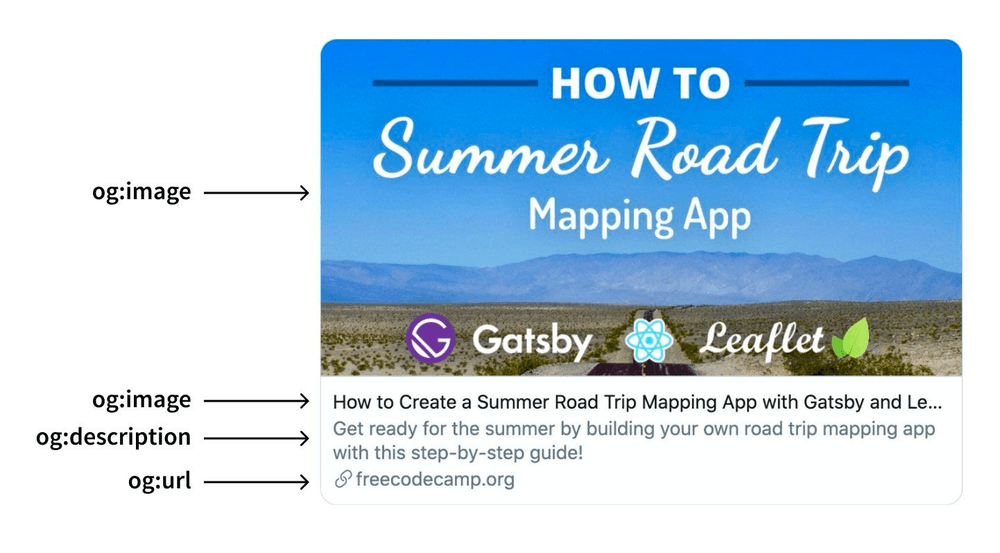
Example of Twitter card using Open Graph tags
Tag type
opengraph의 경우 몇개 대표적인 플랫폼들의 meta tag를 사용할 수 있도록 하고있다.
<!-- 일반 -->
<meta property="og:title" content="...">
<meta property="og:url" content="...">
<meta property="og:type" content="...">
<meta property="og:image" content="...">
<meta property="og:site_name" content="...">
<meta property="og:description" content="...">

<!-- twitter -->
<meta name="twitter:card" content="...">
<meta name="twitter:title" content="...">
<meta name="twitter:description" content="...">
<meta name="twitter:image" content="...">

<!-- mobile -->
<meta property="al:ios:url" content="...">
<meta property="al:ios:app_store_id" content="...">
<meta property="al:ios:app_name" content="...">
<meta property="al:android:url" content="...">
<meta property="al:android:app_name" content="...">
<meta property="al:android:package" content="...">
Optimal size of Opengraph image ?
opengraph에는 thumbnail image를 넣을 수 있다. 하지만 플랫폼마다 지원하는 image size가 다른데 고정값을 넣어주어야 하기때문에 몇가지 유의 사항들을 고려하면 좋다.
facebook에서 권장하는 크기는1200x630픽셀이며, 그 image 파일용량은5MB를 넘지않도록 권장한다600픽셀 미만의 image는opengraph제목 왼쪽에 표시된다- 최소 크기는
200x200이나 해상도가 이정도로 낮은 것은 권장하지 않는다
Caution
기존 페이지에 cache가 남아있을 수 있으므로 적용하는데 시간이 걸릴수 있다
페이스북은 cache를 reload하는 기능을 제공해주기도 한다 https://developers.facebook.com/tools/debug
Useful tools
- opengraph 미리보기 https://www.opengraph.xyz/
- localhost에서 확인을 도와주는 크롬 익스텐션
Localhost Open Graph Debugger
Localhost Open Graph Checker
내용 및 이미지 출처
- https://ogp.me/
- https://iamturns.com/open-graph-image-size
- https://developers.facebook.com/tools/debug/
- https://ogp.me/
- https://iamturns.com/open-graph-image-size
- https://developers.facebook.com/tools/debug/